Five Photos. Any Three Bring Back My Seed Phrase.
Every backup of a recovery phrase has the same flaw: one hiding place, one thing to lose. Here's what it looks like to split a seed phrase across five ordinary photos so that any three recover it — and losing two costs you nothing.
Thinking of simply cutting the phrase into thirds? Read How to Split a Seed Phrase into 3 Parts — Safely first.
There is a moment every crypto owner recognises. You’ve written the twelve words on the card that came in the box, you’ve put the card somewhere clever, and then a small voice asks: what if something happens to that one piece of card?
So you make a copy. Now there are two pieces of card, and you have doubled the number of places someone could find it while barely improving the odds that you can find it after a house move, a flood, or ten years.
That’s the trap. Every ordinary backup makes you choose between losing it and someone else finding it. Improving one makes the other worse.
The idea: make no single copy matter
There’s a piece of cryptography from 1979 that solves exactly this, and it’s called Shamir’s Secret Sharing. Instead of copying your secret, you split it into pieces such that:
- any three pieces reconstruct it exactly, and
- any two reveal nothing — not a partial phrase, not a few of the words, nothing at all.
That second property is the surprising one. Two shares don’t get you “most of the way there”. They get you nowhere. The mathematics is not “hard to reverse” like a password hash; there is genuinely no information in two shares to work with.
Now put each piece inside an ordinary photo.
What it actually looks like
Here is a real run. Five photos off a phone — a harbour, a bridge, an aquarium, a skyline, a street. A 12-word recovery phrase is encrypted, split five ways, and one share is hidden inside each image.
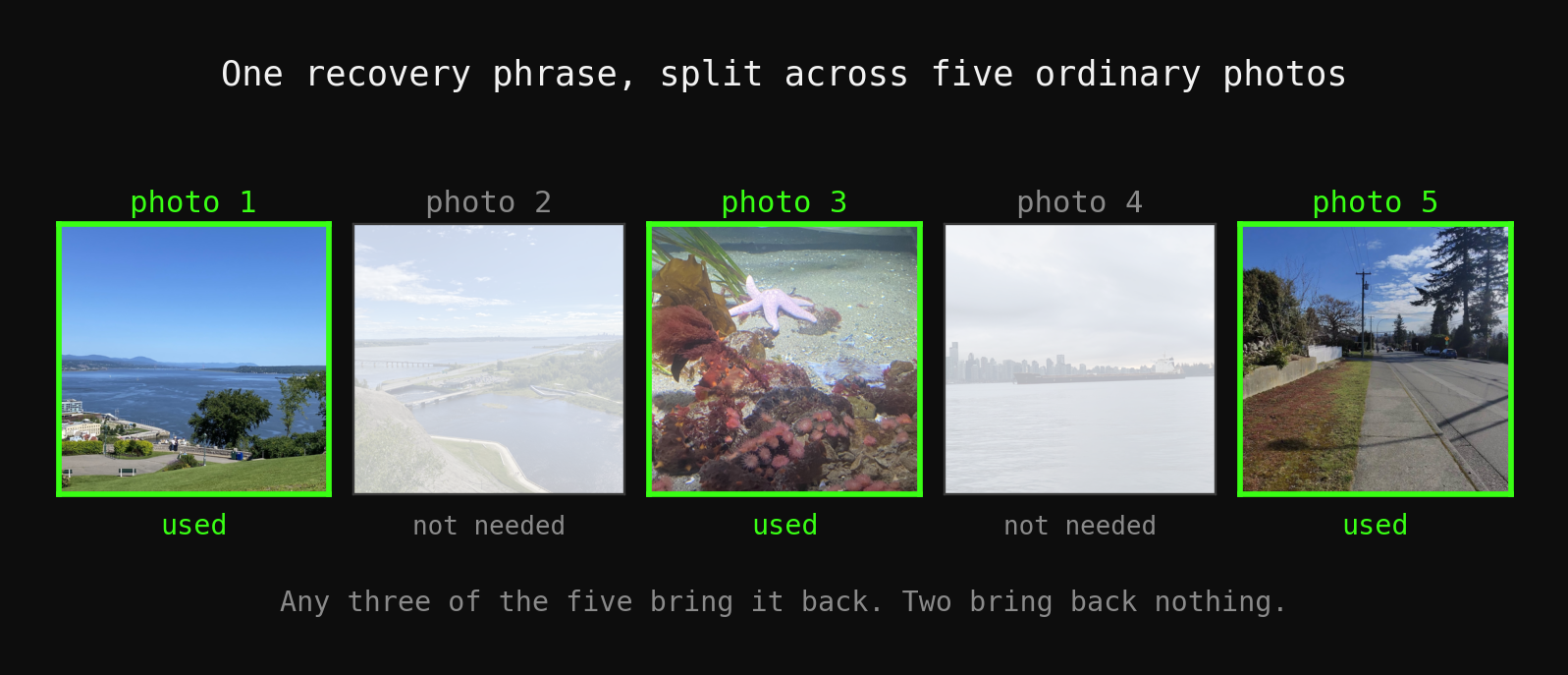
Photos 1, 3 and 5 were handed back to the tool. The phrase came out word for word. Photos 2 and 4 were never opened — they weren’t needed.
Nothing about these files announces itself. They open in any photo viewer. They have no unusual extension, no password prompt, no “encrypted” badge. They are photos.
What it costs the picture
This is the part people expect to be a compromise, and it isn’t:

Across all five images, 1,624 pixels out of roughly 18 million were touched — 0.009% — and no colour channel moved by more than 1 value out of 255. That’s a change far below what a screen can display or an eye can resolve. The numbers on that chart aren’t illustrative; they’re measured from the output files themselves.
Where you’d actually put them
The split only helps if the pieces aren’t all in the same basket. Some arrangements that work:
- Three photos in your own phone’s library, one in a family shared album, one on a USB stick at your parents’ house.
- One with each of two people you trust, three kept by you. Neither of them can do anything with one photo; together with a third they’d still need your password.
- All five in different cloud accounts. A breach of any one account yields a holiday snap.
The rule of thumb: arrange it so that any plausible single disaster — a fire, a theft, a locked account, a falling-out — takes at most two.
The honest part
A tool that stores recovery phrases should be blunt about how it fails, so:
Re-encoding destroys it. Hidden data lives in the least significant bits of the pixels. Anything that re-compresses the image erases it: sending it as an inline photo in most chat apps, letting a photo library convert to HEIC, screenshotting, resizing. Keep them as PNG files and move them as files — attachments, cloud drive, AirDrop. This is the single most common way people lose a stego backup, and it is entirely avoidable.
Damage is reported, not guessed. If an image has been altered or recompressed, StegoSafe says so and tells you to use one of your other shares. It does not hand back a phrase that is subtly wrong. For a backup of a seed phrase, silently returning the wrong words would be far worse than failing outright.
You still need your password. In the apps, recovery takes the threshold number of images and your password. Someone who finds three of your photos still has nothing. If you’d rather have no password at all to be pressured out of you, there’s a device-bound mode where the key never leaves your phone — with the trade-off stated plainly: lose the device, lose the data, permanently, including by us.
This is not a replacement for a metal plate. Steel survives a house fire; a USB stick doesn’t. Splitting solves the single point of failure problem, not the durability problem. Plenty of people should do both — the full comparison is in Where to Store Your Seed Phrase Safely.
Try it on something that isn’t your money
If you want to see the mechanism before you trust it with anything, hide a sentence you don’t care about, split it across five photos, delete two of them, and recover it from the remaining three. Then take one of the stego photos, send it to yourself through a chat app as an inline image, and try to read that one — watch it get reported as damaged. Ten minutes with a throwaway secret tells you more than any amount of reading.
The same five-photo arrangement is what makes a crypto estate plan work without handing anyone your keys while you are alive: What Happens to Your Crypto When You Die?.
The command-line tool is open source if you’d rather read the code than take our word for it, and StegoSafe for iPhone does the same thing with a photo picker instead of a terminal.
Frequently asked questions
What happens if I lose one of the five photos?
Is this safer than writing my seed phrase on paper or steel?
What can destroy the hidden data?
Do I still need a password if the secret is split across photos?
Can someone tell the photos have something hidden in them?
Keep reading
- How to Split a Seed Phrase into 3 Parts — SafelyCutting a recovery phrase into thirds feels safe and is not: lose one piece and the wallet is gone, and the popular 2-of-3 word-overlap trick leaves a 12-word phrase within reach of a brute-force attack. Here is the arithmetic, and the proper way to do it — Shamir's Secret Sharing, where a single share reveals nothing.
- Where to Store Your Seed Phrase Safely: Paper, Metal, Split or HiddenPaper, steel, a safe, a password manager, a photo, Shamir shares or multisig — what each protects against, what it doesn't, the places that are never acceptable, and how to combine them.
- Shamir Secret Sharing, Explained With PicturesSplit a secret into five pieces so that any three rebuild it and any two reveal nothing at all. Not 'nothing useful' — nothing. Here is the 1979 idea behind that, drawn rather than derived, plus where SLIP39 fits and what the scheme genuinely does not protect you from.
StegoSafe is a private recovery vault for seed phrases, recovery codes and private keys, encrypted inside ordinary photos. Protect them with Face ID or Touch ID, or split one secret across several photos so no single copy is enough. iPhone, iPad and Mac — one purchase, no account, no cloud.
Buy StegoSafe — $49.99